


How to securely login to TriumphFX
TriumphFX places utmost importance on security. We have implemented a comprehensive range of measures to safeguard your account and information. Our platform utilizes advanced encryption techniques, including SSL encryption, to secure your data during transmission. We encourage users to choose strong credentials, including a unique username and a complex password, to enhance account security.
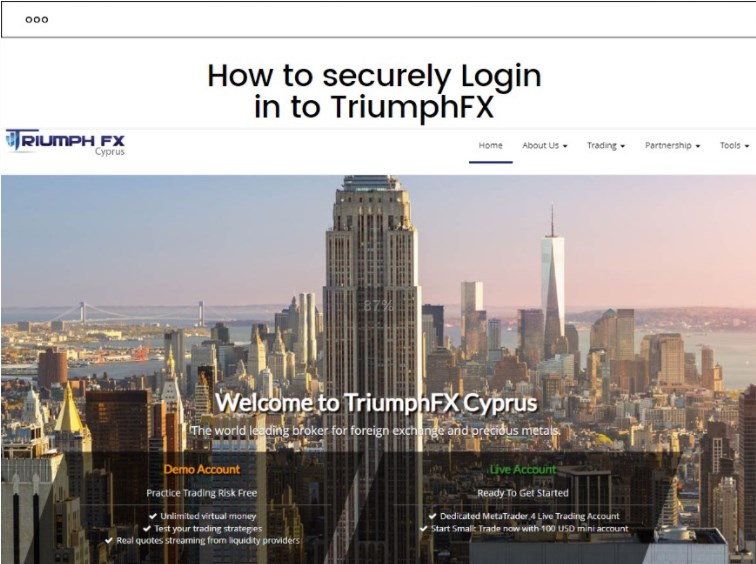
Additionally, it supports the use of two-factor authentication (2FA) for an added layer of protection. We also recommend utilizing password managers for secure storage of your TriumphFX login credentials. Our commitment to security ensures that you can trade with confidence on the TriumphFX platform.
Choosing Strong Credentials for Your TriumphFX Acount
When creating an account on TriumphFX, it is vital to choose a unique username. A unique username helps to enhance the security of your account by making it more difficult for unauthorized individuals to guess or access your account. Avoid using common or easily guessable usernames, such as your name or birthdate. Instead, opt for a username that is distinct and unrelated to your personal information. By selecting a unique username, you add an extra layer of protection to your TriumphFX account, ensuring the safety of your funds and personal data.
Creating a strong and complex password is crucial in safeguarding your TriumphFX account. A strong password should be unique, lengthy, and include a combination of uppercase and lowercase letters, numbers, and special characters. Avoid using easily guessable passwords or common phrases. The more complex your password, the harder it is for malicious individuals to crack it. Remember to refrain from using the same password across multiple platforms and regularly change your password for added security. By creating a strong and complex password, you significantly reduce the risk of unauthorized access to your TriumphFX account and ensure the protection of your assets.
Two-Factor Authentication (2FA)
Two-Factor Authentication (2FA) provides an additional layer of security for your TriumphFX account. By enabling 2FA, you add an extra step to the login process, making it more challenging for unauthorized individuals to gain access. Even if someone obtains your username and password, they would still need the second authentication factor to successfully log in. This significantly reduces the risk of account breaches and protects your funds and personal information. 2FA offers enhanced security and peace of mind, ensuring that only authorized users can access your TriumphFX account.
Enabling 2FA for Your TriumphFX Account
To enable 2FA for your TriumphFX account, navigate to the account settings section. Look for the 2FA options and follow the instructions to set it up. TriumphFX supports various 2FA methods, including SMS-based verification and authenticator apps.
Different 2FA Methods (SMS, Authenticator Apps)
TriumphFX offers multiple 2FA methods for added convenience and flexibility. One method involves receiving a verification code via SMS to your registered mobile number. Once you enter the code during login, you will be granted access to your account. Alternatively, you can utilize authenticator apps, such as Google Authenticator or Authy, which generate time-based one-time passwords (TOTPs). These apps provide a more secure and offline method for generating verification codes. You can scan a QR code provided by TriumphFX to link your account with the authenticator app. By utilizing either of these 2FA methods, you significantly enhance the security of your TriumphFX account.
Let's Log on to Triumphfx Official Website
To ensure a secure login process, it is essential to access the official TriumphFX website directly. Avoid clicking on suspicious links or accessing the website through third-party sources. Type the official TriumphFX website address (e.g., www.triumphfx.com) directly into your browser's address bar to avoid potential phishing attempts. By accessing the official website, you reduce the risk of falling victim to fraudulent activities and protect your account and personal information. You may notice there is https://www.tfxi3.com/, many people mistakenly believe that this is Tfxi official website, but in fact it is not, and this website cannot be opened.
Verifying the Website's Security Features (SSL Encryption, Padlock Symbol)
Before entering your login credentials, always verify that the TriumphFX website has security features in place. Look for the padlock symbol in the address bar of your browser, indicating that the website is secured with SSL encryption. This encryption ensures that any data transmitted between your browser and the TriumphFX servers remains encrypted and protected. Additionally, check for "https://" at the beginning of the website URL, as the "s" indicates a secure connection. Verifying these security features provides confidence that your login information is being transmitted securely.
Entering Login Credentials on the Secure Login Page
After confirming the website's security, proceed to the secure login page provided by TriumphFX. Enter your username and password into the designated fields. Ensure that you enter your credentials correctly to avoid login issues. Double-check your input before clicking the login button. By entering your login credentials on the secure login page, you maintain the confidentiality of your information and reduce the risk of unauthorized access to your TriumphFX account.
Protecting Against Phishing Attempts
Recognizing Phishing Emails and Websites
It is crucial to be vigilant and recognize phishing attempts targeting TriumphFX users. Phishing emails often appear to be from a legitimate source, such as TriumphFX, but they aim to trick you into providing your login credentials or other sensitive information. Look for signs of phishing, such as spelling or grammatical errors, requests for personal or financial details, or urgent calls to action. Be cautious of unsolicited emails and verify the sender's identity before taking any action. Remember, TriumphFX will never ask you to provide your login credentials via email.
Avoiding Clicking on Suspicious Links
To protect yourself from phishing attacks, avoid clicking on suspicious links received via email, social media, or other communication channels. These links may redirect you to fraudulent websites that mimic the TriumphFX login page, aiming to steal your login credentials. Instead of clicking on the links, manually type the official TriumphFX website address into your browser or use a trusted bookmark. By avoiding suspicious links, you minimize the risk of falling victim to phishing attempts and keep your TriumphFX account secure.
Double-Checking the Website URL Before Login
Double-checking the website URL before login is crucial. Watch out for spelling errors or slight variations in the URL that may indicate a phishing attempt. Ensure that the website URL starts with "https://" and has a padlock symbol, indicating a valid SSL certificate. Avoid clicking on suspicious links and manually type the website address if needed. Verifying the URL can help protect your sensitive information from being compromised by fraudulent websites. Stay vigilant and verify the authenticity of the website before entering login credentials.
Security Measures for Devices
Keeping devices and operating systems up to date
It is important to regularly update your devices and operating systems with the latest security patches and updates. This helps protect against known vulnerabilities and ensures that you have the latest security features. TriumphFX also recommends keeping your devices up to date to maintain the highest level of security.
Utilizing reputable antivirus and firewall software
Another important security measure is to use reputable antivirus and firewall software. These tools help protect your devices from malware, viruses, and unauthorized access. TriumphFX recommends using trusted antivirus and firewall software to safeguard your device and data.
Avoiding public Wi-Fi networks for login purposes
Avoid using public Wi-Fi networks, especially for login purposes. Public networks may not be secure, and hackers can intercept your sensitive information. TriumphFX advises using a private and secure network when logging in to ensure the confidentiality of your login credentials.
Secure TriumphFX Mobile Login
Installing the official TriumphFX mobile app
To ensure secure mobile login, it is recommended to install the official TriumphFX mobile app from a trusted source, such as the official app store. This ensures that you are using the legitimate and verified app provided by TriumphFX, reducing the risk of downloading malicious or fake applications.
Enabling biometric authentication (fingerprint, face recognition)
To add an extra layer of security, enable biometric authentication, such as fingerprint or face recognition, in the TriumphFX mobile app. This feature utilizes unique characteristics of your biometrics for login, making it difficult for unauthorized individuals to access your account. TriumphFX encourages users to take advantage of these convenient and secure authentication methods.
Using a secure and private network for mobile login
When logging in to the TriumphFX mobile app, it is important to use a secure and private network, such as your home Wi-Fi or a trusted cellular data connection. Avoid using public Wi-Fi networks as they can expose your data to potential eavesdropping or man-in-the-middle attacks. By using a secure and private network, you can enhance the confidentiality and integrity of your mobile login process.
Conclusion
To ensure a secure TriumphFX login , it is essential to follow the recommended practices. These include double-checking the website URL before login, keeping devices and operating systems up to date, utilizing reputable antivirus and firewall software, avoiding public Wi-Fi networks for login, installing the official TriumphFX mobile app, enabling biometric authentication, and using a secure and private network for mobile login. By implementing these measures, you can enhance the security of your TriumphFX account and protect your personal information.
TriumphFX emphasizes the importance of prioritizing account security to ensure a safe and protected trading experience. By following the recommended security practices and staying vigilant against potential threats, users can safeguard their accounts from unauthorized access, phishing attempts, and other security risks. TriumphFX encourages users to regularly review and update their security measures, remain aware of the latest security best practices, and promptly report any suspicious activities. By working together, TriumphFX and its users can maintain a secure trading environment for all.



Hottest


Copyright © 2026 FastBull Ltd


Risk Warning
FX trading is of high risk and may not be suitable for all investors. Leverage will create additional risks and loss. Before trading, please carefully consider your investment objectives, experience level and risk tolerance. You may lose part or all of your initial investment; do not invest money that you cannot afford. Educate yourself about the risks associated with FX trading. If you have any questions, please consult an independent financial or tax advisor. Any data and information are provided "as is" and only for information purpose, not for trading or recommendations. Past performance does not predict future results.
Disclaimer
The data contained in this website may not be real-time and accurate. The data and prices on this site are not necessarily provided by the market or exchange, but may be provided by market makers, so prices may be inaccurate and differ from actual market prices. Namely, this price is indicative price only to reflect market trend, and is unfavorable for trading purpose. The provider of the data contained in the Website shall not be liable for any loss incurred by you as a result of your trading activities or reliance on the information contained in the Website.